Data Obfuscation
Warning
The current page still doesn't have a translation for this language.
But you can help translating it: Contributing.
Data obfuscation protects sensitive values while preserving data utility for testing.
This guide uses a hybrid approach:
- Build anonymization-oriented models from database metadata in Database View.
- Refine and extend masking behavior in DATAMIMIC DSL models.
Steps
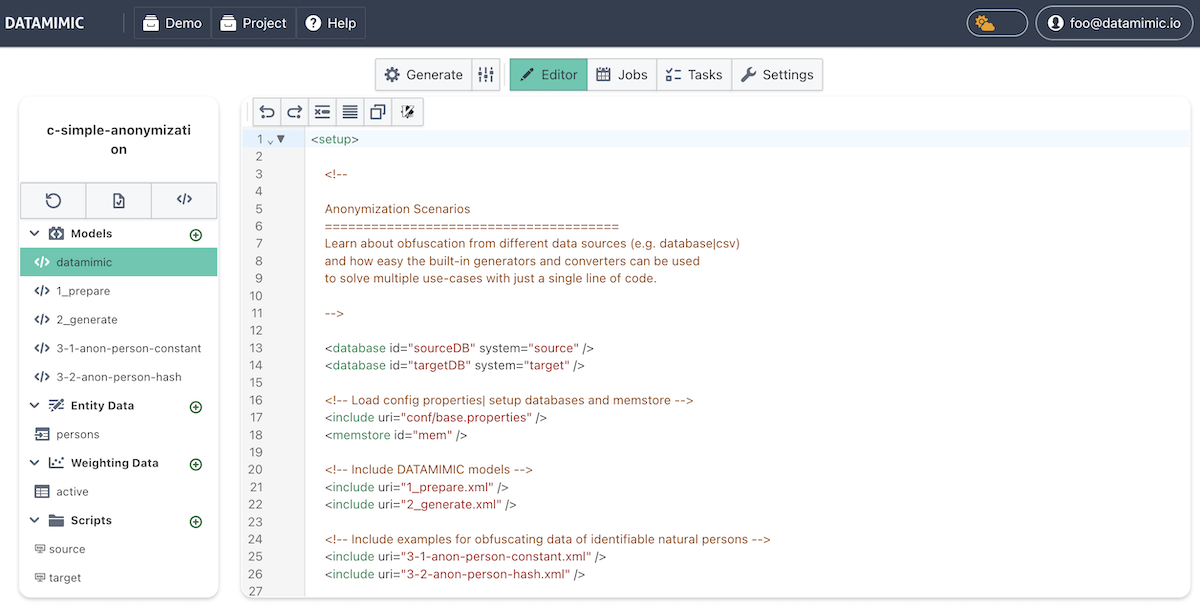
- Open the Demo Store and clone
Basic Masking - The Demo Store is available via the DATAMIMIC icon and provides multiple demos and use cases.
-
Basic Maskingis a concept showcase that demonstrates the core obfuscation workflow. -
Setup Environments
- Ensure both environments are available:
- sourceDB: database read source.
- targetDB: write target for obfuscated records.
-
For details, see Environments.
-
Create a baseline anonymization model in Database View (optional but recommended)
- Use Create Anonymize to generate a first baseline model from metadata.
-
Keep this step lightweight for the demo flow; use Auto-Generate Model from Database for the full step-by-step process.
-
Refine masking behavior in
2_generate -
Use the generated model as baseline.
- Adjust scripts and converters in DSL for business-specific masking behavior.
Variant 1: Database Record Obfuscation
This variant retrieves records from the CUSTOMER table of source and updates the name column. All other columns remain unchanged. The name column is obfuscated by appending _mask. The obfuscated data is written to target.
1 2 3 | |
Variant 2: Database Record Obfuscation with Converter
In Variant 2, built-in converters anonymize existing column values (full_name, email, tc_creation_src).
1 2 3 4 5 6 7 | |
Variant 3: CSV File Obfuscation with Multiple Approaches
This variant obfuscates person records from a CSV file and writes a new output file named ObfuscateCSV.csv.
1 2 3 4 5 6 7 8 9 10 11 12 13 14 15 16 17 | |
Recap
- Review the demo
Basic Maskingfrom the Demo Store. - Build a baseline anonymization model in Database View using Create Anonymize.
- Refine masking behavior in
2_generateand related models (3-1-anon-person-constant,3-2-anon-person-hash.xml).